The AI harness for fundamental research teams.

A research intelligence system for equity and credit analysts / portfolio managers.

IRIS reads the Excel models a research team already maintains, carries each analyst's forecast of the key drivers as an explicit and approved Method, and lets the desk question, test and revise the book without putting the working models at risk.

Case Study: Where does AI-related debt exposure sit?
IRIS answering where AI-buildout financing sits across a 13-model book, who bears it, and how tighter financing conditions transmit through each company
PM View / One question across a 13-model book

Explore freely

Any question can be put to one model in the book or to all of them at once, and because asking is a read-only operation, no question, however it is phrased, can alter a model, an estimate or a record.

Inspect exactly

Before a test runs, IRIS lists every assumption it proposes to change beside the value the model holds today, and after the run it reports the result against a control run on the same version, so the analyst reads the effect of the assumptions and nothing else.

Preserve deliberately

A test runs the the analyst approved rather than whatever an assistant would say today, and the assumptions, results and conclusions enter the record only when the analyst decides they are worth keeping.

A research book that knows itself.

IRIS imports each model in the book and works out how it is built: which periods are history and which are forecast, which cells are operating drivers and which are assumptions, and how each forecast flows through revenue, margins, cash flow and financing. That work is done once, on import, so every question that follows starts with the business rather than with the grid.

On top of the workbook sits what the team knows about it: the Method behind each key driver, the evidence it rests on, the conclusions analysts chose to keep, and every approved version together with the reason the numbers moved.

When a PM asks where AI financing sits across the book, the answer starts from all of that.

IRIS Oracle model with the Research Rail explaining how its forecasts, operating drivers, and financing connect
Research Rail / Oracle model IRIS explains how the Oracle forecasts, operating drivers and financing connect, and the explanation stays with the model as the estimates evolve.
How the model works

Follow the drivers through the financial statements.

IRIS reads the formulas and assumptions already in the workbook and explains how volume and pricing build revenue, how margins turn sales into earnings, and how investment and working capital determine cash flow and financing needs, which gives the analyst a starting point for asking what matters and where to look more closely.

Understand the forecast

Know what sits behind each estimate.

The analyst can ask what supports a margin assumption, what the latest filing says about funding needs, which part of the forecast looks least supported or what would change the investment view, and IRIS answers with the model already understood. That understanding stays with the model as the forecasts change, instead of being re-derived every time someone asks.

Under the hood

IRIS has a headless spreadsheet engine that represents a financial model as structured data, calculates supported formulas without opening Excel, and preserves every approved version of the model together with its history.

Read how IRIS prepares the model for AI

Methods / The forecast, inside Excel

Forecast the key drivers in your own words.

Every forecast in a model rests on a handful of key drivers, and behind each driver sits an analyst's judgment about which evidence matters and how it should move the number.

A Method is that judgment written down as a forecast of the driver, in the form of an instruction to the language model: the evidence it should weigh, the analytical rules it should apply, the limits it should respect and the output it should return. IRIS places the Method in the workbook through =AI(), so the driver is forecast in the cell and flows through every line that depends on it.

=AI()

IRIS can draft a Method from the model and the filings, but nothing shapes an estimate until the analyst has reviewed and approved it.

IRIS showing the evidence and assumptions behind a retail same-store-sales forecast
Method / Same-store-sales guidance The Method for a retailer's same-store-sales estimate names the evidence it weighs and the rules it applies to the forecast.

Each revision of a Method is kept as a new version, and a run that used an earlier version is replayed with that version rather than with the current one.

The sandbox / Test a different view

Test a different view without touching the model.

An analyst can change a market assumption or challenge the company outlook, and IRIS responds by proposing the specific cells it would change, none of which runs until the analyst approves the list. Ask what happens to interest expense if SOFR rises 100 basis points, and the response is a list of cells rather than a description of a scenario.

Before the run

Every proposed assumption, against its current model value.

IRIS finds where SOFR enters the forecast and shows each cell it proposes to change beside what the model holds today. Market values are frozen at the moment of the proposal, and if the market moves before approval, IRIS refuses the stale value rather than running on it quietly.

After the run

Compared with a paired control on the same version.

Pressing Run executes two runs, a control carrying no assumptions and the sandbox bound to it, which share the same version, the same Methods and the same frozen market snapshot and differ only by the assumptions the analyst approved. The comparison is same-quarter, sandbox against control, so what the analyst reads is the difference the assumptions made rather than movement that was already in the forecast.

A run leaves the baseline untouched: the working model, its current version and every approved Method remain as they were, the sandbox and its control are preserved as immutable runs that can be compared at any time, and a note is written to the model only when the analyst chooses to save one.

The record / Keep the history

Know why the numbers changed and when.

A revised estimate should not erase the view that came before it, so IRIS keeps the Method behind the estimate, the evidence, the model change and the resulting financial impact together, and an analyst can return to any version to see what changed, why it changed, who approved it and how the change flowed through the model.

IRIS model history showing successive versions of the forecast, with the current version selected
Compare earlier forecasts and recover the reasoning behind each revision.

Every entry in the record is written explicitly, by an analyst or by an approved run, and is versioned. Nothing is absorbed in the background, and an earlier run is replayed as it stood at the time rather than as the system understands the model today.

PM View / Across the book

Put one question to the whole book.

The same move in rates, spreads, demand or pricing rarely affects two companies in the book the same way.

A PM who wants to know which models should change in response to a move in the market has traditionally had to ask each analyst in turn. PM View puts the question to every model at once and follows each answer back to the forecast, the assumptions and the evidence it rests on, while the models themselves, and the analysts who own them, remain the authority on what the numbers should be.

When the world changes, which of my models should change with it, and why?

Where does AI-buildout financing sit across the book, and who bears it? Where are higher rates hurting earnings? Which companies need refinancing? Where would wider spreads improve returns? Which estimates depend on assumptions that have just moved?

IRIS can also refresh approved market and economic inputs overnight, identify which estimates depend on what changed, and rerun the affected analysis with the Methods the analysts approved, so the morning review begins with a list of which forecasts moved, which held and why, each with the assumptions and evidence behind it.

IRIS comparing how different credit conditions affect companies across the book
PM Search / Across the book One question about credit conditions, answered company by company from the assumptions and forecasts in each model.
IRIS answering what changed overnight across the companies in the book
PM Search / Morning review The estimates that moved overnight, and where the morning review should begin.
A worked inquiry / CoreWeave

Case Study: Where does AI-related debt exposure sit?

The inquiry starts with CoreWeave (CRWV), traces its financing obligations, asks who bears the exposure and examines what would change its value, with each answer setting up the next question, from the scheduled debt to the evidence an investment view would need.

It begins with evidence already in the model: lease obligations, the cash interest rate forecast, delayed-draw term loan (DDTL) and OEM financing disclosures, undrawn borrowing capacity, and equity. From there, it asks whether the exposure can be connected to other companies in the book.

A useful finding from the inquiry: in the exchange below, IRIS identifies the gap between forecasting contractual debt payments and estimating a DDTL's market value, and sets out what is still needed to close it: which loan is being valued and as of when, its expected cash flows, market pricing, contractual terms, and credit risks. The next question asks how to resolve each gap.

CoreWeave workbook beside IRIS explaining the valuation approach and evidence still needed to estimate a DDTL market value
01 / Establish what the evidence supports IRIS distinguishes the model's principal and borrowing-cost forecasts from the evidence a market valuation would need. Open the screenshot to read the response.
CoreWeave Research Rail with a follow-up drafted in the composer asking which gaps need a revised approach to the estimate, an analyst note, or additional evidence
02 / Frame the next analytical step The analyst drafts the follow-up, asking whether each unresolved item calls for a revised Method, a saved note, or new evidence. Open the screenshot to read the question.
Follow the inquiry: 11 questions from obligations to an investment thesis

Where the debt sits

  1. Which financing obligations does this model schedule explicitly, and which does it only name from the filings without a row?
  2. For the delayed-draw term loans, what committed, drawn and undrawn amounts does the available evidence establish, and as of what date?
  3. How does the model treat the OEM and software financing, and is any of it double-counted with the disclosed debt total?
  4. What does the model assume about lease liabilities versus lease payments, and where would a committed GPU lease show up?

Who bears it

  1. For DDTL 3.0, who is borrower, guarantor, arranger, disclosed lender and known current holder, and which of those roles has a date attached?
  2. Which of those lenders is a public company in the book, and what would be needed to connect this facility to that lender's model?

How its value changes

  1. What drives the cash interest rate assumption, and what happens to interest expense if SOFR moves 100 bp?
  2. Which obligations reprice with market rates and which are fixed, and does the model separate them?
  3. What would have to be true about revenue or utilization for the scheduled repayments to be covered from operations rather than refinancing?

Where the model is thin

  1. What evidence is missing before this model could support a mark on the DDTL, and which of those items are in the filings already available with the models?
  2. Which of the unknowns you named would a saved note or a revised approach to the estimate resolve, and which need new evidence?

Carry the conclusion forward. None of the eleven questions changed the model. The analyst decides which of them produced something worth keeping and saves that as a note with the model, so that weeks later, when a colleague picks up the financing question, they start from the evidence, the interpretation and the questions that were still open.

Available now / IRIS in Claude and Codex

Work in Claude or Codex for Excel.

Claude and Codex supply the reasoning, and IRIS supplies the models, the sandbox and the record, so an analyst can put a question to the book, follow it into a company model and test an assumption in one conversation, with the findings worth keeping saved to IRIS where the next analyst will find them.

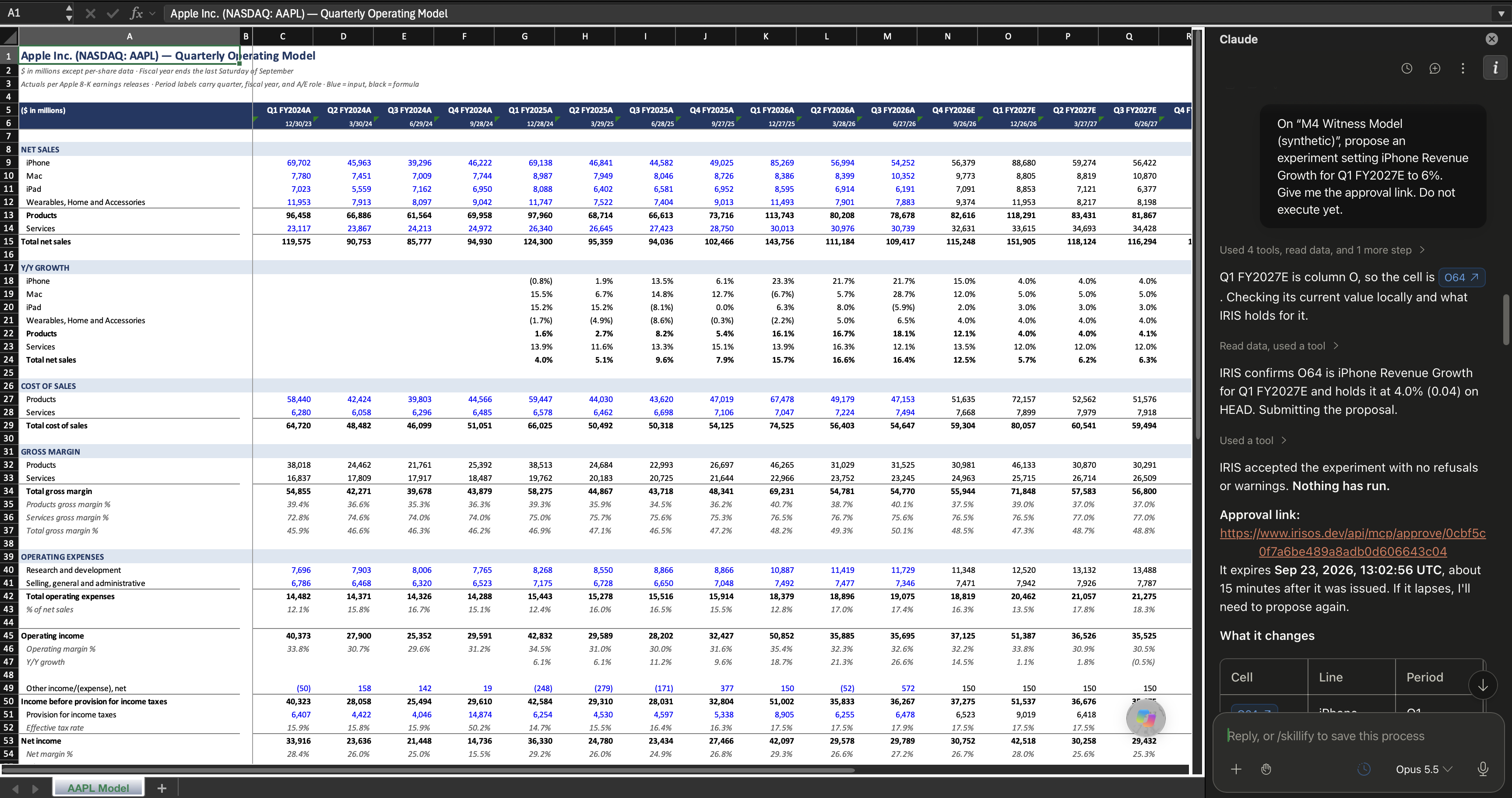
The AAPL quarterly operating model open in Excel beside Claude, where IRIS has accepted a proposed experiment and returned an approval link, with nothing run yet
Claude / AAPL model IRIS has accepted a proposed experiment on the Apple model and returned an approval link, with nothing run yet.
Model Catalog / The round trip between IRIS and Excel

Pull a model from the catalog, work it in Excel, and keep the record in IRIS.

The Model Catalog holds prepared company models, each with its coverage, checks and limitations described and with draft Methods for its key drivers waiting as proposals for review. An analyst adds an independent copy to the IRIS workspace, downloads the original workbook with its formulas and formatting intact, and works it in Excel through Claude or Codex, while every approved change, test and note travels back to IRIS, where the record of the model lives.

IRIS Model Catalog listing the Oracle quarterly operating, capacity and financing model, with Preview and Add to Workspace buttons and a note that forecast Methods arrive as proposals for review
Model Catalog / Oracle Preview the prepared Oracle model, then add an independent copy to the workspace or download the original workbook.
Claude in Excel finding Oracle's quarterly operating, capacity and financing model in the IRIS Model Catalog, before it has been added to the workspace
01 / Find the model from Excel Asked about Oracle from inside Excel, Claude finds the prepared model in the IRIS catalog.
Claude in Excel confirming that the Oracle model has been added to the IRIS workspace at the analyst's request and providing a link to open it
02 / Add it to the workspace IRIS places a copy in the analyst's workspace and returns a link, and the record of the model begins there.
From one model to the whole book

One record, whether you work in IRIS or in Excel.

IRIS is built for research teams who want to use AI to keep their models up to date, to preserve the work behind each estimate, and to keep that work visible across the book. The analyst can work in the IRIS web app, with the Research Rail, the sandbox and the model history beside the workbook, or stay in Excel and reach IRIS through Claude or Codex, and in either case the models remain in the workbook, the analyst decides the Method, and the record is the same.